Mapping User Details from LDAP Server to Adeptia Connect Server
It is very likely that the Adeptia Connect server and LDAP server uses different parameters to store their user accounts information. Therefore, while configuring LDAP, you will be required to map the user details from your LDAP server to Adeptia Server. To configure mapping between the two servers, Adeptia Connect provides ldapConfiguration.xml file, which is stored in ServerKernel/etc folder. After successful retrieval of LDAP user object (based on specified base DN and base filter) and authentication, it's attributes are queried to be mapped to Adeptia user attributes so that similar user can be created inside Adeptia. If retrieval of specified attribute (field) from LDAP user object fails, it is populated with NA. So, all the fields are optional, except for the "uniqueIdentifier" which specifies the attribute through which user is uniquely identified in LDAP Server and we need this attribute value for creating user in Adeptia. The configurable ldapConfiguration.xml file has each field for a user in Adeptia Connect as an element which contains the following two attributes:
- Mapped-to: This attribute contains the name of the user attribute which is to be mapped with user details in Adeptia Connect server.
- Default-value: This attribute contains the default value for the corresponding field.
The following screen shot displays the tags and attributes in the ldapConfiguration.xml file.
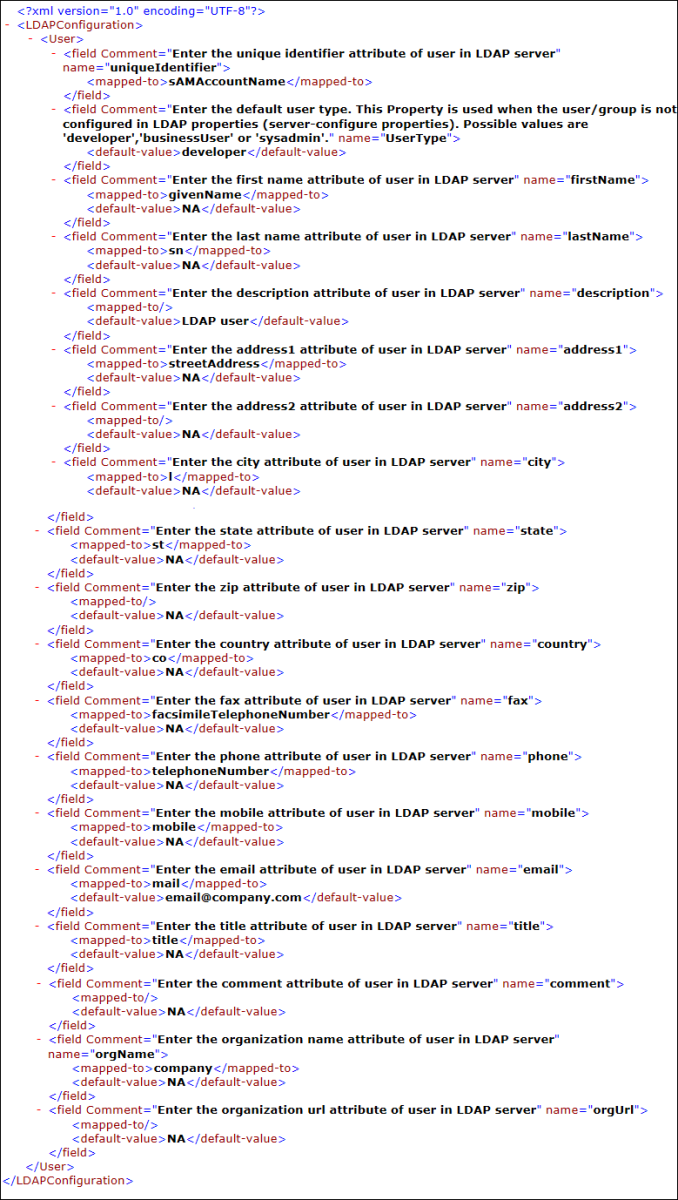
Refer to the table given below for the fields and their corresponding attributes in the LdapConfiguration.xml file that you need to set for mapping the user details to Adeptia Connect server.
| Field Name | Field Description | Sample or Possible Values (for "mapped-to" element in configuration XML) | Default Value (in case value From mapped attribute can't be fetched – specified by "default-value" element in configuration XML) |
|---|---|---|---|
| uniqueIdentifier | It specifies the user attribute that defines its uniqueness in LDAP Server. |  | It is mandatory to provide a valid value for this Environment Variable. |
| firstName | It specifies the user attribute that defines its first name. | givenName | N.A. |
| lastName | It specifies the user attribute that defines its last name. | sn | N.A. |
| description | It specifies the user attribute that defines any description about the user. | LDAP user | |
| address1 | It specifies the user attribute that defines its address. | streetAddress | N.A. |
| address2 | It specifies the user attribute that defines its address. | N.A. | |
| city | It specifies the user attribute that defines city where user resides. | l | N.A. |
| state | It specifies the user attribute that defines state where user resides. | st | N.A. |
| zip | It specifies the user attribute that defines zip of state where user resides. | - | N.A. |
| country | It specifies the user Attribute that defines country where user resides. | co | N.A. |
| fax | It specifies the user Attribute that defines its fax #. | facsimileTelephoneNumber | N.A. |
| phone | It specifies the user Attribute that defines its phone #. | telephoneNumber | N.A. |
| mobile | It specifies the user attribute that defines its mobile #. | mobile | N.A. |
| It specifies the user attribute that defines its email id. | email@company.com | ||
| title | It specifies the user Attribute that defines its title. | title | N.A. |
| comment | It specifies the user attribute that defines any comment for it. | - | N.A. |
| orgName | It specifies the user attribute that defines name of organization where user works. | company | N.A. |
| orgUrl | It specifies the user attribute that defines URL of organization where user works. | - | N.A. |