Login to Adeptia Connect with multiple partner
Users can be assigned to multiple company/partners as per the requirement and while login, users can select the specific company/partner to login. Therefore, you have the flexibility to choose the specific company/partner while login Adeptia Connect.
Login Adeptia Connect
-
On the login screen, enter the login credential and click login.
-
Now, select the name of the company/partner from the drop-down list of Select Company/Partner drop-down list and click Login. This field is only visible if you are assigned with multiple company/partner.
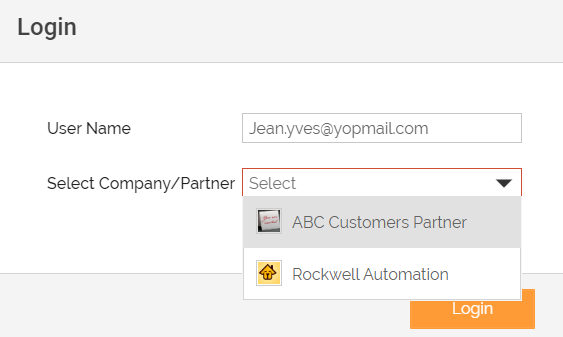

You can login and access the objects associated with one partner at a time, being as a member of multiple partners. -
The Adeptia Connect Home Page appears with details associated with the selected company/partner.
You can also change the company/partner and role from the Adeptia Connect Home Page. Follow the steps to change the Partner/Company:
- Go to My Account section on Adeptia Connect Home Page.
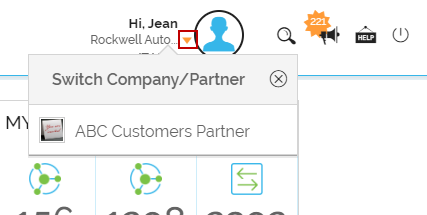
- Click the icon which displays the list of company/partner.
- Select the specific company/partner from Switch Company/Partner list which will switch the your objects associated with this.
- Similarly, you can also switch the role if you are assigned with multiple roles.
You may be interested in...